The N+1 Query Problem: The Hidden Performance Killer

What is it?
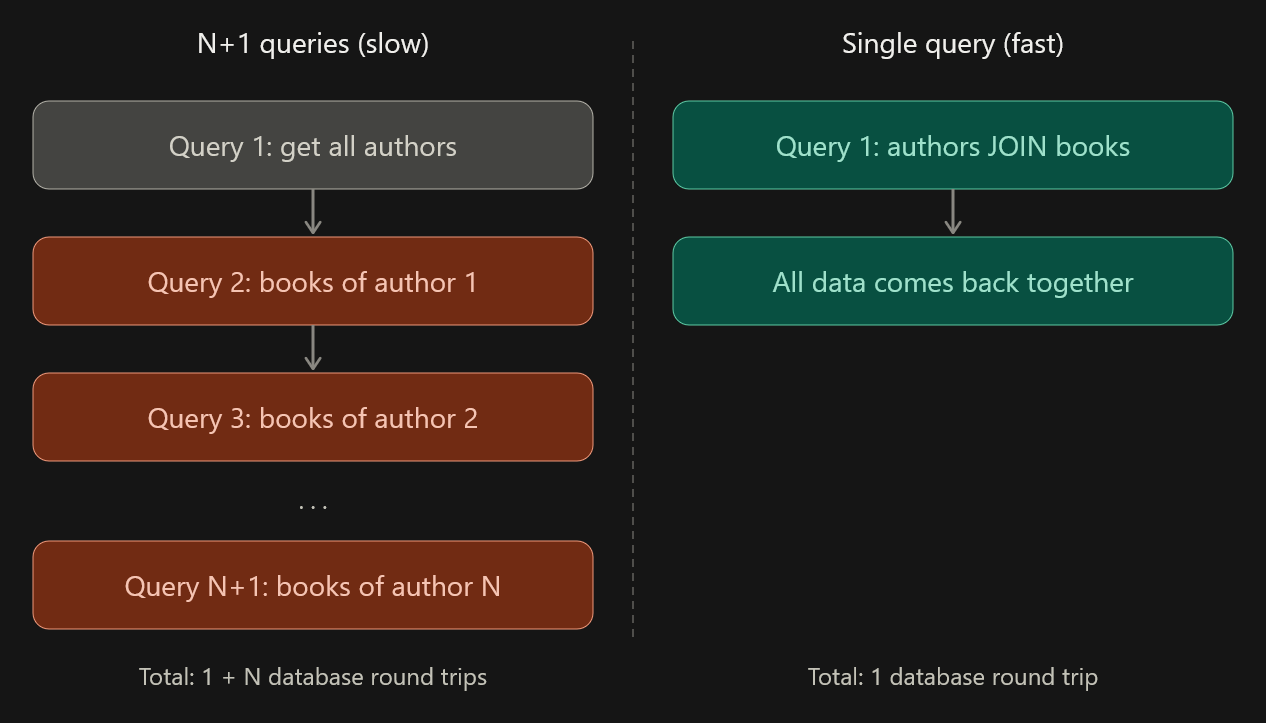
The N+1 query problem happens when your code runs 1 query to fetch a list of records, then runs N more queries (one per record) to fetch related data.
If you have 100 authors and want their books, you end up with 101 queries instead of 1 or 2.
It is most common when using an ORM (Django, Hibernate, Sequelize, Rails ActiveRecord, etc.), because lazy loading hides the extra queries from you.
Real-life analogy: the grocery run
Imagine you need 10 items from a supermarket.
- N+1 way: you drive to the store, buy one item, drive home, then repeat this 10 times.
- Smart way: you take a list, buy all 10 items in one trip, and come home once.
Each "trip" is a database round trip. The items are the same, but the cost is very different.
How it happens: an example
Suppose you have two tables, authors and books. One author has many books. You want to print each author with their book titles.
The N+1 code (Django):
authors = Author.objects.all()          # Query 1

for author in authors:
    print(author.name)
    for book in author.books.all():     # Query for EACH author
        print(" -", book.title)
What actually hits your database:
SELECT * FROM authors;                        -- 1 query
SELECT * FROM books WHERE author_id = 1;      -- +1
SELECT * FROM books WHERE author_id = 2;      -- +1
SELECT * FROM books WHERE author_id = 3;      -- +1
-- ... and so on, N times
The code looks clean, but the database is doing far too much work.
Why is it a problem?
- Slow responses: every query adds network and database latency.
- Doesn't scale: 10 records feels fine, 10,000 records can freeze a page.
- Higher cost: more load on the database means bigger servers and bigger bills.
- Hard to notice: it works fine in development with small data, then breaks in production.
How to fix it
The idea is simple: fetch the related data up front instead of one by one. This is called eager loading.
Fix 1: Django (prefetch_related)
authors = Author.objects.prefetch_related("books")   # 2 queries total

for author in authors:
    for book in author.books.all():   # no new query here
        print(book.title)
For a many-to-one relation, use select_related, which uses a SQL JOIN:
books = Book.objects.select_related("author") # 1 query totalFix 2: Raw SQL (JOIN)
SELECT a.name, b.title
FROM authors a
LEFT JOIN books b ON b.author_id = a.id;
The same idea in other frameworks:
How to detect it
- Enable SQL logging and look for the same query repeating with different IDs.
- Use tools: Django Debug Toolbar, Hibernate statistics, Rails Bullet gem, or your APM (Datadog, New Relic).
- Count queries in tests: Django's
assertNumQueriesfails a test if the query count grows unexpectedly.
Best practices
- Always check the generated SQL when working with related data.
- Load only what you need. Eager loading everything can also be wasteful.
- Test with realistic data sizes, not just 5 rows.
- Add query-count assertions to your tests for critical pages.
Conclusion
The N+1 problem is not a bug in your logic. The code gives correct results, but it is secretly inefficient. Once you learn to spot repeated queries and use eager loading, you can turn 101 queries into 2 and make your app much faster.