DNS
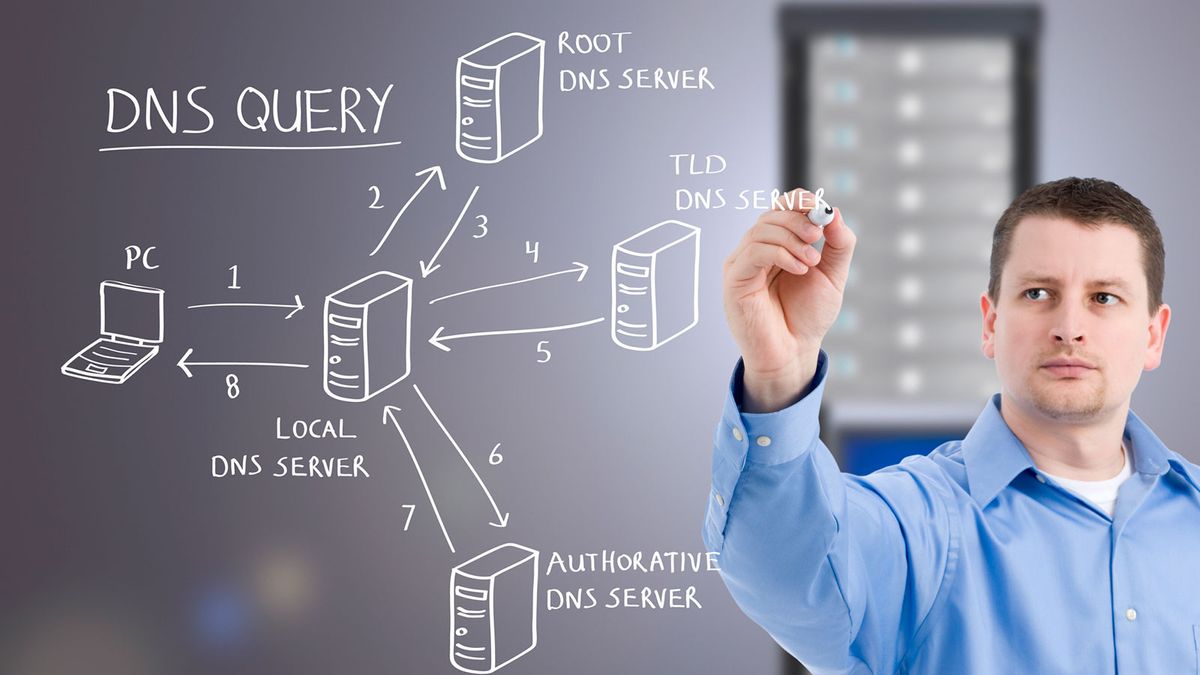
1. What is DNS?
DNS (Domain Name System) is the system that translates human-readable domain names like google.com into IP addresses that computers use to communicate.
Think of it like the phonebook of the Internet:
Human
  │
  │  google.com
  ▼
 DNS
  │
  │  142.250.x.x
  ▼
Server
You remember:
google.comYour computer ultimately needs:
IP address2. What are DNS Records?
DNS records are instructions/data stored in DNS that tell the Internet what a domain or subdomain should point to or how it should behave.

For example:
example.com       A       192.168.1.10
www.example.com   CNAME   example.com
example.com       MX      mail.example.com
Think:
DNS = phonebook DNS Record = an individual entry in that phonebook
Important DNS records
3. What is DNS Resolution?
DNS resolution is the process of converting a domain name into its corresponding IP address.
For example:
You type:

https://google.com

       ↓

DNS Resolution

       ↓

IP address

       ↓

Browser connects to that IP

       ↓

Website loads
A DNS resolver may use its cache first. If the answer isn't cached, it queries DNS servers to find the authoritative answer.
How DNS Resolution Works?
Suppose you type:
www.example.comStep 1 — Browser asks DNS Resolver
Browser
   │
   │ "What is the IP of www.example.com?"
   ▼
DNS Resolver
The resolver might already have the answer in its cache.
If not, it continues.
Step 2 — Resolver asks Root Server
DNS Resolver
      │
      ▼
Root DNS Server
The root server essentially says:
"I don't know the IP ofwww.example.com, but I know which servers handle.com."
Root
 ↓
.com TLD servers
Step 3 — Resolver asks .com TLD Server
DNS Resolver
      │
      ▼
.com TLD Server
The .com server says:
"I don't have the final IP, but I know the authoritative nameserver for example.com.".com
↓
example.com authoritative nameserverStep 4 — Resolver asks Authoritative DNS Server
DNS Resolver
      │
      ▼
Authoritative DNS Server
This server contains the actual DNS records for the domain.
For example:
www.example.com
        ↓
A Record
        ↓
93.184.216.34
Step 5 — Resolver returns the IP
Authoritative DNS
       │
       │ 93.184.216.34
       ▼
DNS Resolver
       │
       │ 93.184.216.34
       ▼
Browser
The browser can now connect to:
93.184.216.34and request the website.

The entire process
                 DNS RESOLUTION

Browser
   │
   │ www.example.com
   ▼
DNS Resolver
   │
   ▼
Root Server
   │
   │ "Ask .com"
   ▼
.com TLD Server
   │
   │ "Ask example.com nameserver"
   ▼
Authoritative DNS Server
   │
   │ A Record
   │ 93.184.216.34
   ▼
DNS Resolver
   │
   │ 93.184.216.34
   ▼
Browser
   │
   ▼
Web Server
One thing you should understand clearly
There are different DNS servers involved:
DNS Resolver
     ↓
Root Nameserver
     ↓
TLD Nameserver
     ↓
Authoritative Nameserver
Their jobs are different:
| Server                   | Job                                                 |
| ------------------------ | --------------------------------------------------- |
| **Recursive Resolver**   | Finds the answer for your computer                  |
| **Root Server**          | Points toward the correct TLD                       |
| **TLD Server**           | Points toward the domain's authoritative nameserver |
| **Authoritative Server** | Contains the actual DNS records for the domain      |
What is Anycast DNS?
Anycast DNS means the same DNS IP address is advertised from multiple DNS servers located in different geographic locations.
When you make a DNS query, network routing sends your request to the nearest/best available DNS server, rather than always sending it to one fixed server.
Simple example
Without Anycast:
                 DNS Server
              1.1.1.1 — USA
                   ▲
                   │
India ─────────────┘
With Anycast:
                    ┌── DNS Server — USA
                    │
User ──→ 1.1.1.1 ───┼── DNS Server — India
                    │
                    ├── DNS Server — Europe
                    │
                    └── DNS Server — Singapore
All these servers can advertise:
1.1.1.1Your request is routed to an appropriate location.
Why use Anycast DNS?
- Faster: Your DNS query can reach a nearby server.
- More reliable: If one DNS location goes down, routing can send traffic elsewhere.
- Scalable: Many DNS servers can share the same IP address and handle queries.
One-line definition
Anycast DNS = multiple DNS servers in different locations using the same IP address, with Internet routing directing your DNS request to an appropriate server.